3D Printing in California: Your First Look + Best Gear
Ever think about how rocket parts get built, right here in our Golden State? Or maybe you’ve seen some seriously cool printed stuff. 3D Printing California is blowing up, from big names like SpaceX all the way down to folks making cool hacks and even edible art at home. Not sci-fi. It’s real. Changing how we make things.
Additive Manufacturing: Cutting Down on Junk. That’s Huge
Forget the old school way: carving stuff out of a big block. “Subtractive manufacturing.” Makes a mountain of trash. Like wood chips or metal everywhere.
3D printing? Totally different. It’s “additive.” You begin with squat and build, real simple, one layer at a time. Only put material where you need it. The outcome? Way less waste. Good for your cash. Good for Earth. A seriously good thing.
More Than Just Toys: Printers Make Real Stuff?
Yeah, you can print a tiny action figure, which is neat. But what these printers really do is nuts. Practical stuff for your kitchen. Custom lid holders. Adjustable supports for anything. Need a Wi-Fi QR code sign or a broom holder that fits? Poof! Done.
And another thing: in the real world, it gets wilder. Edible food, custom clothes, even prosthetics that look real. Big California industrial companies, the ones messing with rockets, they’re printing parts because it’s quicker, cheaper. NASA’s checking out 3D printing to make tools for astronauts way out there, trimming down how much junk they carry. Oh, and listen to this: actual multi-story houses printed with specific concrete, right where they’ll stand. Folks already live in them. They look sharp.
FDM Printing: For Us Regular Folks
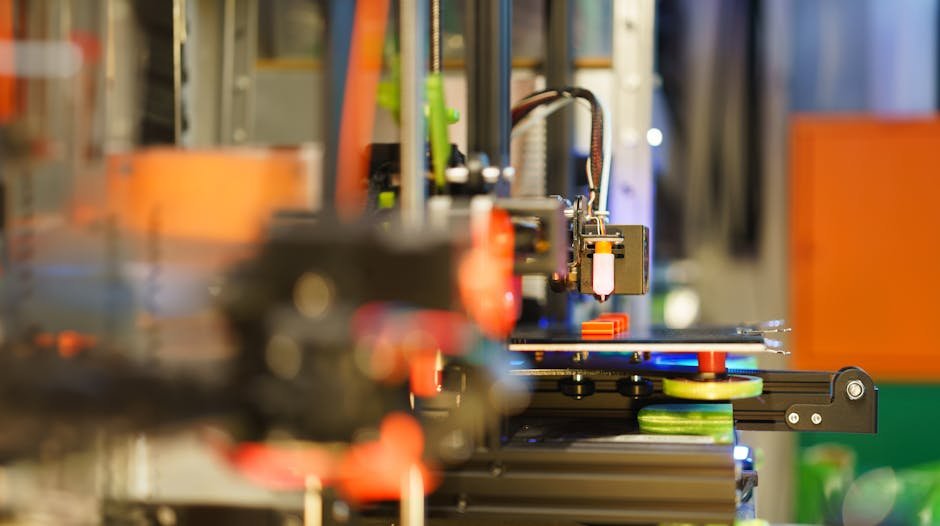
Okay, tons of printer types exist. But the one you’ll probably see most often, especially for home use? That’s FDM: Fused Deposition Modeling. Super simple. A long plastic string, called filament, goes into a hot nozzle. Hits that heat, melts, then puts down a thin line. Layer after layer. Before you know it, object created.
Filament usually comes on big spools. Size? About 1.75mm thick – imagine two credit cards. Colors? You want it; they got it. Now, there are a million filament types out there, but PLA (Polylactic Acid) is what you want if you’re just starting. Very common. Easy to use. Pretty forgiving. Other stuff is more bendy or super strong for fancy projects.
Entry-Level vs. Pro: Bambu Lab’s A One and X One Carbon Showdown
Let’s talk machines. Companies like Bambu Lab are doing wild stuff in the 3D printing game.
For a dang good starting spot, check out the Bambu Lab A One 3D printer. It goes for about $339 (late 2024). Desktop size. Fits awesome on your workbench or a corner desk. Uses a magnetic build plate, so prints just pop off. Touchscreen, phone app control. Easy peasy. Even has a camera for sweet time-lapse videos of your creations.
But the A One? It’s a “bed slinger.” Meaning the print bed rockets back and forth. Works great! Just needs desk room. Also “open-frame.” Can’t control its inside temp or dampness. No good for some fancy materials.
Ready to step it up? The Bambu Lab X One Carbon is a souped-up (and pricier) machine, built to fix those issues. This model is fully enclosed. Super important internal temp management gets handled. It’s a “Core XY” design; the print head flies around (X and Y), while the bed barely moves. Much more stable. Especially for big prints.
And another thing: the X One Carbon is packed with crazy tech. LiDAR, for example, scans that first layer to make it perfect. Better camera for time-lapses. Plus, its enclosed setup and special fan keep the heat just right and clean the air. Key for some materials.
Color Splash! Multi-Material Printing
No more just one color. We’re past that. With systems like Bambu Lab’s AMS (Automatic Material System), tons of colors. The A One? It links up with the AMS Lite, which takes up to four different colored spools. Each spool even has a little chip, so the printer knows what’s up.
Heads up though: multi-color printing takes longer. The machine spits out old filament to get the new color in. Every single time. So you get a bunch of “waste spaghetti” from those changes. That’s the trade-off. For seriously bright, colorful stuff. The X One Carbon uses another AMS, a fully closed one. Keeps humidity out. Makes for way better prints with sensitive types of filament.
Digital Brain to Real Thing: The “Slicer” Explained
Got a neat idea? Or downloaded a 3D model? How does the printer figure it out? Enter the “slicer” software. You dump your model (usually standard files) into the slicer. This program then “slices” your digital creation into hundreds and hundreds of thin layers. It kicks out something called G-code. That G-code? Basically, a full “how-to” guide for the printer: go here, get hot, push plastic.
Luckily, you don’t really need to understand G-code. Just click “print.” The slicer zaps its orders to your machine. Modern printers deal with all that tech jargon for you.
Your Printer Pick: What’s Really Key?
Picking a 3D printer? Depends on what you wanna do. For new folks, the A One is an awesome, easy-to-use machine. But if you need super exact stuff, fast prints, full environment control, and plan to use hardcore materials, then a closed-frame, Core XY system like the X One Carbon? Definitely worth spending on.
Seriously think about:
- Build volume: Max size of your printed stuff?
- Material compatibility: What filament types can it even use?
- Environmental control: Do you need that enclosed box for certain materials to print right?
Look, patience. You need it. The first layer is super important; gotta stick perfect. Often, a hot, textured print bed helps, maybe even some glue. Printing shapes with parts hanging off? You’ll need to add supports. Temporary structures that print right beside your model. Snap off clean later. Don’t you dare skip them.
Custom manufacturing 3D Printing California style, from your garage to legit giant factories, is just getting wilder. Massive change.
Burning Questions, Quick Answers
“Additive” vs. “Subtractive.” What’s the deal?
Additive (like 3D printing) builds up, layer by layer, from nothing. Way less waste. Subtractive starts with a big chunk. Carves stuff away. Makes a pile of junk.
Multi-colored prints possible?
Yep! Systems like Bambu Lab’s AMS make it happen. Printer quickly swaps colors. But because it has to switch, it spits out some old filament each time. Some waste.
“Bed leveling”? Why even care?
Means getting your print surface super flat. Critical. New printers often handle this themselves. If the bed’s not even? First layer messes up. Prints won’t stick. Total fail.